Help Center
Everything you need to set up and manage your automated messages.
How It Works
1. The Trigger (The Start Point)
Create your invoice in Xero as normal. The moment you click Approve, the invoice details land in your PaidInstantly Dashboard.
2. The Two Paths (The Decision)
Option A: Manual Mode (Safe Default)
If 'Auto-Send' is OFF: The invoice appears in your list with a green 'Send WhatsApp' button. When you click it, a box will pop up asking for the customer's mobile number. Simply type it in (e.g., +447...) and hit Send.
Option B: Auto Mode (Hands Free)
If 'Auto-Send' is ON: We detect the 'Approve' click in Xero and send the WhatsApp immediately using the number saved in the contact. You don't need to do anything.
3. The "First Run" Guide (Crucial New Box)
⚠️ Recommended: Do a Test Run First
Two Choices for testing:
- Option A: Use the Xero Demo Company (Risk-free).
- Option B: Use your Real Account (Faster). Create a new contact called Me, add YOUR mobile number, create a £1.00 invoice, and click Approve.
- (You can simply credit note/void the invoice afterwards)
How to use the Bookkeeping Query Bot
Connect the Client (One-Time Setup)
Before you can ask questions, you must connect the business owner's phone number to the system.
- 1. Go to the Bookkeeping Queries tab.
- 2. Type the Client's Phone Number (+44...) in the box.
- 3. Click Send Welcome Message.
-
Important: Wait for the client to reply "YES" on WhatsApp to turn the system on.
Ask a Question
Pick any payment that needs an explanation and click the green 'Ask Client' button.
"We instantly WhatsApp the client: 'What was the payment to Amazon for £24.99?'"
Getting the Answer
When the client replies (like 'Office Supplies'), we save it for you to check:
Manual Mode (Default)
Answers appear in the Pending Review section. You check them, then click Post to Xero.
Automatic Mode
If turned on, answers are immediately sent to Xero and the job is finished automatically.
Professional Advice
We suggest using Automatic Mode for clients who give clear answers. Use Manual Mode for clients who might send confusing replies that need extra checking.
Message Templates
The 3 Green WhatsApp Bubbles (Polite, Professional, Urgent).
Polite
Sarah, hope you are well! Your invoice from Dave's Plumbing for £85.00 is ready. https://in.xero.com... Thanks
Professional
Dear Tech Corp, please accept invoice #INV-2024 for £1,250.00. Due 31 Jan. https://in.xero.com... Regards
Urgent
Hi Mike, invoice #INV-1009 for £450.00 is OVERDUE. Pay immediately: https://in.xero.com... Thank you
Note: The link shown above (https://in.xero.com...) is just a placeholder example. When you send a real message, it is automatically replaced by the real, unique Xero payment link for that specific invoice.
Saving Numbers in Xero
The guide on using +44 formatting and the Contact field.
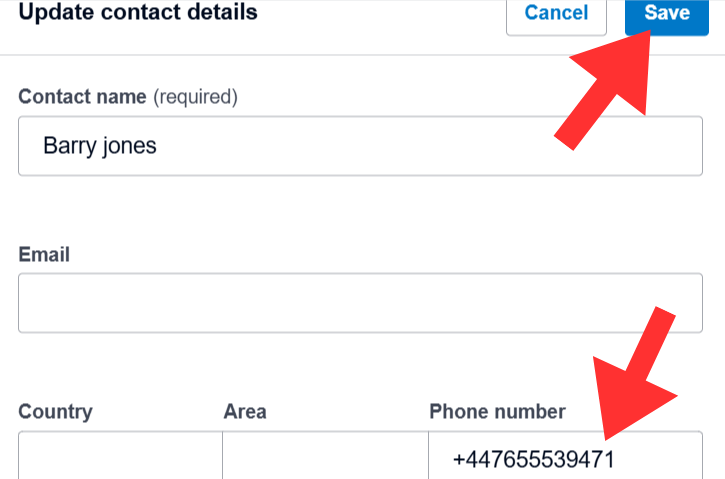
For automation to work, mobile numbers must be saved in the specific format below.
-
✓Use +44 format (drop the first 0)
-
✓Add to Phone number field
-
✓Click Save (Critical!)
Common Issues & Troubleshooting
The "Hit 20 Limit" and "Message didn't send" tips.
Message didn't send?
Check the phone number is in +44 format. Standard 07... numbers will fail.
Customer didn't receive?
Confirm they have WhatsApp installed and valid account on that number.
Hit 20 limit?
You are on the Beta Free Tier. Email support to unlock more credits.
Auto-send failed?
Did you click Save in Xero? The webhook only fires on the 'Save' action.
Still need help? We're here for you.
hello@paidinstantly.co.uk